On this page
- What Contractor Prequalification Is
- Why Clients Ask You to Prequalify
- Who's Involved in Contractor Prequalification
- When You'll Be Asked to Prequalify
- What Clients Typically Ask For
- How to Calculate TRIF and Lost-Time Frequency Correctly
- WCB Clearance Letters and Letters of Good Standing
- Experience Rating, Industry Rates and Insurance Certificates
- COR or SECOR Status and the Program Behind It
- Drug and Alcohol Policies and Subcontractor Management
- How Prequalification Platforms Work
- Build Your Document Library Before You Sign Up
- Answer Questionnaires Truthfully, With Evidence
- How to Handle a Failing Grade or Deficiency
- Keep Your Prequalification Current
- Budgeting the Cost and Time
- A Working Safety Program Is the Real Prequalification
- A Practical Workplace Example
- Common Prequalification Mistakes to Avoid
- What an Auditor Expects to See
- The Bottom Line
- Download the Checklist and Tracker
- Frequently Asked Questions
- Related Guides and Articles
- How Calgary Safety Consultants Can Help
- Sources
What Contractor Prequalification Is
Contractor prequalification is a screening step. Before a client lets you bid, sign a contract or send a crew through the gate, it asks you to prove that you can do the work safely. You answer a questionnaire, upload documents and statistics, and someone on the client's side, or a reviewer working for a platform the client uses, checks what you sent against the client's requirements.
Prequalification isn't only Canadian. The UK Health and Safety Executive's leaflet on using contractors suggests clients ask about a contractor's recent health and safety performance, accidents and enforcement history, how the work will be managed and how subcontractors are checked. It adds that the level of enquiries "should be determined by the level of risks and the complexity of the job."
WorkSafe New Zealand's advice on contracting describes prequalification as asking tenderers to demonstrate an effective health and safety management system, with supporting documents as evidence.
For a small or mid-size contractor, contractor prequalification is really a test of whether your paperwork shows a working safety program. Get it right once, keep it current, and it becomes a sales tool rather than a hurdle.
Why Clients Ask You to Prequalify
Clients don't ask for prequalification to make your life harder. They ask because the law holds them responsible for the contractors they bring onto their sites, and prequalification is one of the ways they show they've met that duty. Our guide to managing contractor safety explains the owner's side in detail, but a few examples show why the questions keep coming.
- Alberta. Under the OHS Act, a contracting employer that directs another employer must ensure, as far as reasonably practicable, that the other employer complies with the Act, the regulations and the OHS Code. A prime contractor must establish, as far as reasonably practicable, a system or process that ensures compliance at the site.
- British Columbia. The Workers Compensation Act requires the prime contractor of a multiple-employer workplace to coordinate health and safety activities and to do everything reasonably practicable to keep a system that ensures compliance.
- Saskatchewan. A contractor that hires and directs others must set up a system of shared responsibilities and monitor subcontractors to make sure they comply.
- Ontario. The constructor on a project must ensure that every employer and every worker on the project complies with the Act and regulations, as Ontario's guide to the OHS Act explains.
Every province and territory, and the Canada Labour Code for federally regulated work, gives employers and the people who control a workplace duties toward others who work there. Workers' compensation adds a money reason: in many provinces, a client can be held liable for a contractor's unpaid premiums if it doesn't check the contractor's account, which is why clearance letters show up on almost every list.
Who's Involved in Contractor Prequalification
Three or four parties usually take part, and it helps to know what each one wants.
- The hiring client. The owner, operator or general contractor sets the requirements: which documents, which statistics, what insurance limits and what score or status you need to be approved. Requirements often differ by site, by the type of work and by how risky the client considers it.
- The platform, if there is one. Many larger clients use a third-party platform such as ISNetworld, Avetta or ComplyWorks to collect and review contractor information. You subscribe, connect to the client and submit through the platform.
- Your own team. Someone has to own the account. In a small company that's often the owner or office manager; in a larger one it might be the safety coordinator. Whoever it is needs access to your safety program, your statistics, your insurance broker and your WCB account.
- The client's site and safety people. Passing prequalification gets you through the door. Once you're working, the client's safety advisors will check that your crew actually does what your documents say.
When You'll Be Asked to Prequalify
You'll usually meet prequalification at one of four points: when you register as a vendor with a new client, when you're invited to bid on a project, before your crew gets site access, and every year after that when the client or platform asks for updated statistics and documents. Some clients also ask again when the scope of your work changes, for example when a contractor that has only done low-risk maintenance starts bidding on work at heights or in confined spaces.
The worst time to start is when a bid closes in a week. Platform reviews take time, insurance certificates come from your broker, and clearance letters and statistics need someone to pull them together. If you work, or want to work, for larger owners or general contractors, assume prequalification is coming and get ready before the invitation arrives.
What Clients Typically Ask For
Every client sets its own list, but most contractor prequalification requests draw from the same set of documents. Use this as your starting checklist.
- Your health and safety program or manual. Clients want to see a written program that fits your work, with the program elements they expect: policy, hazard assessment, safe work practices and procedures, training, inspections, incident investigation, emergency response and so on. Our guide to building a health and safety system covers the parts.
- Specific policies and procedures. Working alone, fall protection, lockout, harassment and violence prevention, and others that match your trade.
- Hazard assessment records. Samples of completed job hazard analyses and field-level hazard assessments show the program is used.
- Training records. A training matrix and certificates for the workers and supervisors who'll do the job.
- Injury and illness statistics. Usually three to five years of hours worked, recordable cases, lost-time cases and the frequency rates calculated from them.
- Workers' compensation documents. A current clearance letter or letter of good standing, and sometimes your experience rating or industry rate information.
- Insurance certificates. Commercial general liability, automobile and sometimes other coverage, with the limits and wording the client requires.
- COR or SECOR status. Your certificate and its expiry date, if you hold one.
- Subcontractor management. How you select, check and supervise your own subcontractors.
- Drug and alcohol policy. Where the client asks for one, usually in construction and energy work.
Some clients add regulatory orders, incident summaries, inspection records or a sample site-specific safety plan. Read every requirement before you upload anything.
How to Calculate TRIF and Lost-Time Frequency Correctly
Statistics are a common place to lose marks, often because the numbers are calculated differently from year to year or from client to client. The common approach is a rate per 200,000 hours worked. The U.S. Bureau of Labor Statistics explains how to compute an incidence rate: multiply the number of cases by 200,000 and divide by the total hours all employees worked. The 200,000 represents 100 full-time workers working 40 hours a week for 50 weeks.
- Total recordable injury frequency (TRIF). Number of recordable cases times 200,000, divided by hours worked.
- Lost-time injury frequency (LTIF). Number of lost-time cases times 200,000, divided by hours worked.
Here's a worked example. A contractor with 18 workers logs 36,000 hours in a year and has one recordable injury, which was also a lost-time injury. Both rates are 1 times 200,000 divided by 36,000, or 5.56. A year with no injuries gives 0.00. That swing from a single case is normal for a small company.
Definitions matter too. Where a questionnaire uses U.S. OSHA definitions, a recordable case is one that results in death, days away from work, restricted work or transfer to another job, medical treatment beyond first aid, or loss of consciousness. Clients define a lost-time case in slightly different ways, usually around time away from work after the day of the injury. If the client uses its own definitions, use them for that client, and keep a note of which definition each number follows.
A few habits keep your statistics credible:
- Use actual hours from payroll, not an estimate, and include overtime.
- Count every case in the year it happened, and update that year's figures if a case later becomes lost time.
- Keep a one-page calculation sheet for each year, showing hours, case counts, the formula and the result.
- Make sure your numbers match your incident records, your WCB claims and what you've told other clients.
Clients know small numbers can mislead. A 2019 article in Professional Safety on the limitations of loss rates showed that one injury at a 10-worker firm produces a rate of 10.0, and recommended that clients also look at training, experience, pre-task planning, monitoring and post-job evaluations. If your rate jumps because of one case, explain it in the comments with the incident summary and the corrective actions you took. An honest explanation with evidence reads far better than a blank.
WCB Clearance Letters and Letters of Good Standing
A clearance letter, called a clearance certificate in some provinces, confirms you're registered with the workers' compensation board and your account is in good standing. Clients ask for it because, in many provinces, they can be liable for a contractor's unpaid premiums if they don't. For you, a current letter is one of the quickest wins in any prequalification file.
| Jurisdiction | Document | Issued by | Worth knowing |
|---|---|---|---|
| Alberta | Clearance letter | WCB-Alberta | Clients are advised to get one before hiring and before releasing payment |
| British Columbia | Clearance letter | WorkSafeBC | Requested before and after the work; should show you active and in good standing for the whole contract period |
| Saskatchewan | Letter of good standing and clearance | WCB Saskatchewan | A letter of good standing is valid only on the day it's requested; a clearance is needed before the client pays |
| Manitoba | Clearance | WCB Manitoba | Through the online WCB Clearance Request System, before hiring and before final payment |
| Ontario | Clearance certificate | WSIB | Required in construction before work begins and for the duration of the work; valid for up to 90 days |
| Quebec | Validation de conformité and attestation de conformité | CNESST | Through MonEspace CNESST: the contractor gets a validation de conformité as proof of compliance when bidding; at the end of each contract, an attestation de conformité releases the client from possible liability for the contractor's unpaid premiums |
| New Brunswick | Clearance certificate | WorkSafeNB | Available through WorkSafeNB's online clearance certificate service |
| Nova Scotia | Clearance letter | WCB Nova Scotia | Downloaded through MyAccount when the account is in good standing; the expiry date is on the letter |
| Prince Edward Island | Clearance letter | WCB PEI | Confirms the contractor's account is in good standing; looked up online through WCB PEI's clearance letter request page |
| Newfoundland and Labrador | Clearance letter | WorkplaceNL | Requested through a connect account by the client or the contractor |
| Yukon | Clearance letter | Yukon Workers' Safety and Compensation Board | Also called a letter of good standing or compliance letter; requested from the board |
| Northwest Territories and Nunavut | Good Standing Letter and final clearance | WSCC | A final clearance is requested after the contract end date |
If you work in more than one province or territory, or in a federally regulated sector, ask each client which board's letter it needs. Names, validity and online services change, so check the board's current page before you rely on a letter.
Because many letters expire quickly or are valid only for the period shown, set a reminder to pull a fresh one at the start of each quarter, and check your board account for any arrears before a client does. If you work in more than one province, you'll need a letter from each board where you have workers.
Experience Rating, Industry Rates and Insurance Certificates
Some clients ask for your WCB experience rating or for your premium rate compared with your industry's rate. It's a rough, independent measure of your claim costs. WorkSafeBC, for example, explains that your base rate reflects your industry's injury costs and that experience rating compares your own claim costs over the past three years with your rate group, which can earn a discount of up to 50 per cent or a surcharge of up to 100 per cent over time.
In Alberta, WCB-Alberta's 2026 pricing guide explains that experience rating applies a discount or surcharge to the industry rate based on your claim costs, and that holding an Alberta COR can earn a further discount through the Partnerships in Injury Reduction program. Other boards have their own programs. Download your rate statement from your board account each year and keep it in your library, so you can answer the question in minutes.
Insurance certificates are usually handled by your broker. Send your broker the client's exact requirements, including limits, additional insured wording and how the certificate must be addressed, and ask for certificates for each client. Record every policy's expiry date, because an expired certificate can make an approved contractor suddenly show as non-compliant.
COR or SECOR Status and the Program Behind It
Many clients, especially in construction and energy, ask whether you hold a Certificate of Recognition. A COR shows your health and safety management system has been audited against a recognized standard. In Alberta, the Government of Alberta explains that a COR is issued jointly by a Certifying Partner and the Government of Alberta, and that passing requires at least 80 per cent overall and at least 50 per cent in each audit element.
Where a SECOR program is offered, as in Alberta, British Columbia, Saskatchewan, Manitoba and Yukon, small employers can pursue a SECOR instead; Energy Safety Canada describes its SECOR as designed for companies with 10 or fewer employees, with maintenance required in the second and third years.
Calgary Safety Consultants helps contractors prepare for COR and SECOR, but we don't issue certificates. CORs and SECORs are issued through the applicable certifying partner. Our guides on preparing for a COR audit and preparing for a SECOR evaluation explain the process.
A COR or SECOR won't answer every prequalification question, but it does make most of them easier, because the audit forces you to build and keep the same evidence clients ask for. You'll find more on certification and audits in our COR, SECOR and prequalification guides.
Drug and Alcohol Policies and Subcontractor Management
Where a client asks about drugs and alcohol, it usually wants a written policy covering fitness for work, prohibited conduct, post-incident steps and support for workers. In construction, maintenance and oil and gas, many owners point to the Canadian Model, a best practice alcohol and drug policy that stakeholders in those industries can adopt. Version 6.1 was issued in 2023 by the Construction Owners Association of Alberta and Energy Safety Canada.
If a client requires that model or its own policy, make sure your policy meets it before you say yes.
Subcontractor management questions ask how you choose, check and supervise the companies you hire. Have a short written procedure, a simple subcontractor prequalification form, a list of approved subcontractors with their clearance and insurance dates, and records showing you orient and monitor them. Clients see your subcontractors as part of your risk, so treat them the way you want your clients to treat you.
How Prequalification Platforms Work
Prequalification platforms generally follow a similar pattern. The client sets its requirements. You subscribe, connect to that client, complete the questionnaires and upload your documents, and the client sees your status against its requirements. Here's what each platform says on its own pages.
- ISNetworld. ISN's frequently asked questions say contractors and suppliers pay an annual subscription fee and a one-time account setup fee per country. Its prequalification page says submitted information is reviewed by ISN's Review and Verification Services (RAVS) team against regulatory and hiring client requirements, and that client requirements can be configured by location, level of risk or specific designations.
- Avetta. Avetta's company prequalification page says its specialists review your health, safety, sustainability and policy documents, that you can upload documents once and share them across multiple clients, and that you can review policy, limit and endorsement requirements for insurance. Its plans page says supplier plans are based on the number of connections and the project or trade risk level, and that a client-connected plan is required to work with clients.
- ComplyWorks. ComplyWorks is a Veriforce Canada product that lets clients manage compliance by site or project, with requirements aligned to the work. Its subscriber information for contractors advises logging in regularly to keep information current, managing your compliance status by client, completing online orientation requests and acting on alerts and notifications.
On any platform, the client decides what "approved" means. Two clients on the same platform can ask for different documents and accept different statistics. Read each client's requirements separately, and contact the platform's support team when a requirement isn't clear. We don't rank or recommend one platform over another; use whichever your clients require.
Build Your Document Library Before You Sign Up
The best thing you can do for contractor prequalification is organize your evidence before you pay for a subscription. A tidy library turns a three-week scramble into a few days of uploading.
- Set up one folder structure. Use folders that match the categories clients ask for: program and policies, hazard assessments, training, statistics, WCB, insurance, COR or SECOR, subcontractors, and inspections and incidents.
- Use clear file names. Include the document name, version or year, and expiry date, such as "WCB-AB clearance, expires 2026-12-31". Reviewers open hundreds of files, and a clear name helps them find the evidence.
- Keep only current versions in the main folders. Archive old versions so you never upload last year's certificate.
- Make your manual easy to search. Number sections, add a table of contents and keep a cross-reference that shows where each common requirement is covered, for example "Fall protection: Section 7.4, page 52."
- Prepare samples. Pick recent, complete and legible examples of a hazard assessment, an inspection, a safety meeting record and an incident investigation, with personal information removed.
- Record every expiry date. Put them in one register so you can see what's about to lapse. Our Prequalification Tracker, below, does this for you.
If the library shows gaps, such as no written subcontractor procedure or no investigation records, fix the program first. Uploading documents that don't reflect what you actually do creates bigger problems later.
Answer Questionnaires Truthfully, With Evidence
Safety questionnaires can run to dozens or hundreds of questions. The temptation is to tick "yes" and move on. Don't. Clients and reviewers compare your answers with your documents, and a "yes" without evidence usually comes back as a deficiency.
- Answer the question that's asked. If it asks whether supervisors are trained in incident investigation, the answer is about supervisors and investigation training, not your general training program.
- Point to the evidence. Reference the section and page of your manual, or upload the record that proves it.
- Say "no" when the answer is no. Then explain what you do instead, or what you're putting in place and by when. A truthful "no" with a plan is better than a false "yes" that fails on review or, worse, on site.
- Use "not applicable" carefully. Explain why, for example "We don't perform confined space entry; our scope excludes it."
- Keep answers consistent. Your statistics, staff numbers and scope of work should match across every client and platform.

Someone will eventually check your answers in the field. If you say every worker completes a daily hazard assessment, the client's safety advisor may ask your foreman for today's. Answer as if that check is coming.
How to Handle a Failing Grade or Deficiency
Deficiencies on a first contractor prequalification submission are common, so don't panic. A deficiency tells you exactly what's missing, and most are quick to fix.
- Read the comment carefully. Note exactly which requirement wasn't met and what evidence the reviewer wants. Many deficiencies come from a missing page, an expired date or an answer that didn't reference the document.
- Fix the cause, not just the comment. If the reviewer says your program lacks a required element, add it properly, train your people on it and keep the records. That fix will help with every other client too.
- Respond with specifics. Upload the corrected document and explain where the requirement is now met, by section and page.
- Talk to the client when it matters. If you're below a client's threshold because of statistics, ask whether it accepts a variance or an explanation with corrective actions. Some clients will approve a contractor conditionally with extra monitoring.
- Track every deficiency to closure. Use a simple log, like you would for corrective actions, with the date raised, what was done and the date closed.
If the same deficiencies keep coming back in contractor prequalification reviews from different clients, the gap is in your program, not your paperwork.
Keep Your Prequalification Current
Prequalification isn't a one-time job. Documents expire, statistics need annual updates, and clients change their requirements. An approved contractor can drop to non-compliant overnight because one insurance certificate lapsed.
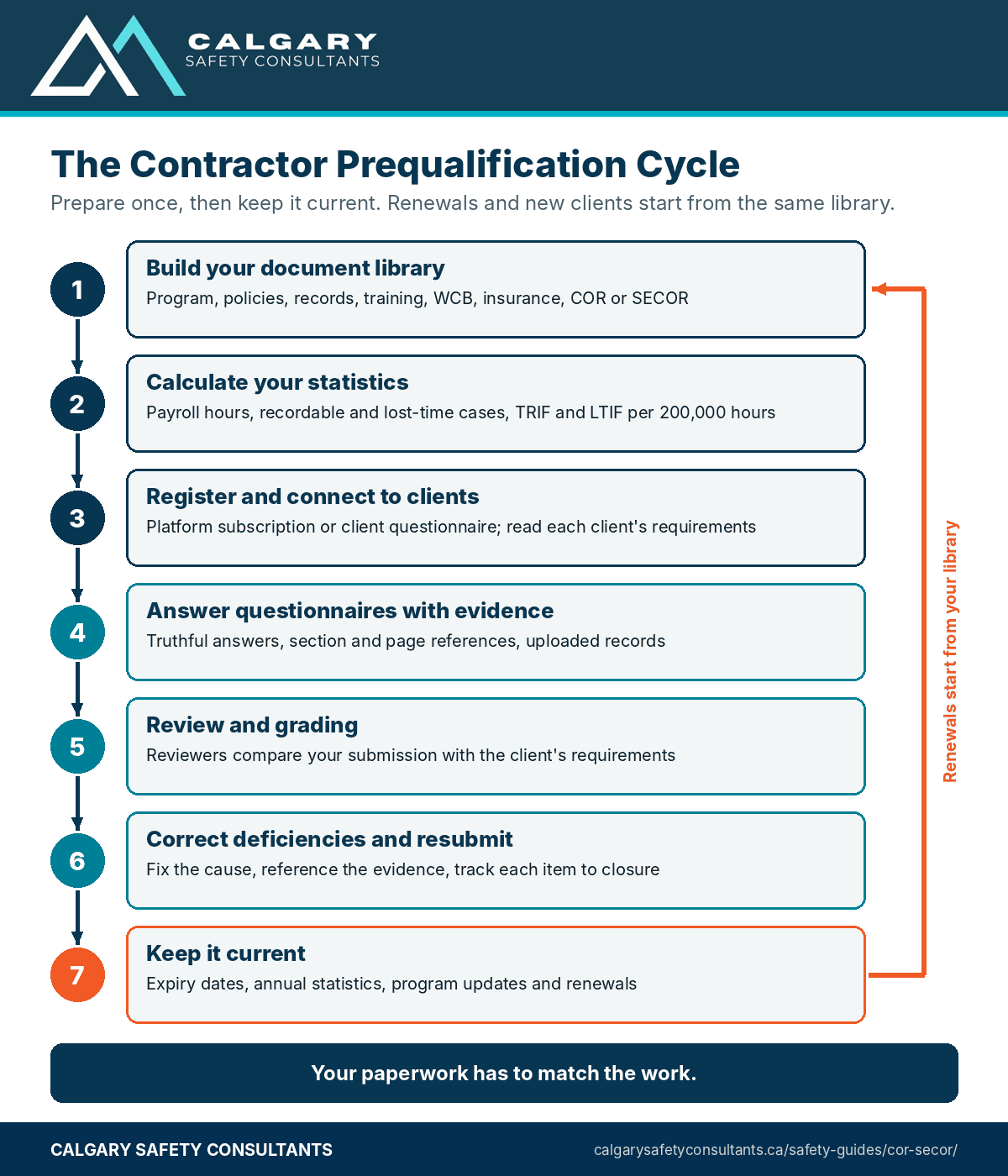
- Track expiry dates. Insurance, clearance letters, COR or SECOR, training certificates and the platform subscription itself all expire. Set a warning window, such as 30 or 60 days.
- Update statistics early in the year. Clients and platforms commonly ask for each new year's hours and cases once the year ends. Close the year's numbers in January, check them against your incident records and WCB claims, and update every account at once.
- Review your program yearly. Update your manual, date the revision and upload the new version, so reviewers don't see a program that hasn't changed in five years.
- Watch for notices. Platforms can send alerts when documents expire or requirements change. Make sure they reach someone who'll act on them, not an old email address.
- Renew subscriptions on time. A lapsed subscription can interrupt your status with connected clients, so check each platform's terms.
Budgeting the Cost and Time
Contractor prequalification costs money and time, and it's better to plan for both. On the money side, expect platform subscription fees for each platform your clients use, which can depend on the platform and, depending on the platform, on your company size, the number of clients you connect to or the risk of your work. Some platforms also charge a setup fee. Check each platform's current pricing on its own site or with its sales team.
Then add the costs outside the platform: time to build or update your safety program, insurance changes if a client wants higher limits, COR or SECOR costs, and outside help if you use it.
On the time side, the first submission is the big one. If your program and records are in good shape, a few days of focused work may be enough. If you're building a program from scratch, plan on weeks or months, because clients want to see records showing the program has been in use. After that, budget a few hours a month to keep documents current, plus extra time each year for statistics and renewals.
A Working Safety Program Is the Real Prequalification
It's easy to treat contractor prequalification as a paperwork exercise. The contractors who pass easily, year after year, are usually the ones whose paperwork simply describes what they already do.
Research supports looking beyond the numbers. A 2020 study of commercial construction sites in the American Journal of Industrial Medicine reviewed existing prequalification surveys and found none had been validated against injury outcomes. Its own survey of leading indicators found that sites with higher average scores had a better safety climate and fewer injuries involving days away, restriction or transfer, although no significant link was found at the level of individual companies.
The study was small and cross-sectional, so it doesn't prove cause and effect, but it points the same way experienced reviewers do: planning, training and supervision matter.
That's the link between a working safety program, a COR or SECOR and passing prequalification. Build the program, use it every day, keep the records, and the audit and the questionnaire both become a matter of showing what's there. Our guide to workplace safety inspections and our guide to incident investigation cover two of the records reviewers ask for most.
Workplace example
A Practical Workplace Example
Situation: Consider a 22-person electrical contractor in Manitoba that had always worked for local builders. A large food manufacturer invited it to bid on plant maintenance work, on condition that it prequalify through the platform the manufacturer used within 30 days. The owner had a safety manual from several years earlier, insurance certificates in his email, and no calculated injury statistics.
Action: The office manager built a document library first, in folders matching the client's requirements. The owner updated the manual, added a subcontractor procedure and a drug and alcohol policy, and pulled three years of payroll hours to calculate TRIF and lost-time frequency on one sheet. They downloaded a current WCB clearance, got certificates from their broker with the client's wording, and only then subscribed and submitted.
The first review came back with six deficiencies, mostly missing page references and one missing training record, and all six were closed within a week.
Result: The contractor was approved before the bid closed. Because the library and tracker were already built, a second client's request three months later took two days. The owner now updates statistics every January and reviews the tracker at each monthly safety meeting.
Common Contractor Prequalification Mistakes to Avoid
- Starting when the bid is due. Reviews, broker certificates and statistics all take time.
- A generic manual that doesn't fit the work. Reviewers notice when a program mentions hazards you never face and misses the ones you do.
- Inconsistent statistics. Different hours or case counts for different clients raise immediate questions.
- Estimating hours. Use payroll records, not a guess.
- Answering "yes" without evidence. A claim with no document or page reference is a deficiency waiting to happen.
- Uploading expired or unsigned documents. Check dates and signatures before you submit.
- Letting certificates lapse. One expired insurance certificate or clearance can change your status with every connected client.
- Ignoring platform notices. Alerts sent to an old email address don't fix anything.
- Paperwork that doesn't match the field. If the client's site visit finds no hazard assessments, your approval won't last.
Audit perspective
What an Auditor Expects to See
Prequalification reviewers and COR auditors look for the same thing: evidence that the program on paper is the program in use. That means a current program that fits your work, completed records, statistics that match your incident records, and current certificates and clearances.
Energy Safety Canada's 2023 COR audit protocol includes elements on statistical analysis, safety records and other affected parties, and IHSA's COR 2020 audit tool includes a procurement and contractor management element that asks clients to set health and safety criteria for selecting, monitoring and evaluating contractors, including the contractor's ability to assess and control hazards from its own work.
Reviewers also check consistency. If you say supervisors investigate incidents, they'll expect investigation reports signed by supervisors. If you say every worker is oriented, they'll expect orientation records for the workers on your roster. Gaps between answers and evidence are where scores drop.
Calgary Safety Consultants helps contractors prepare prequalification submissions and COR and SECOR audits; we don't issue certificates or approve submissions. CORs and SECORs are issued through the applicable certifying partner, and each client decides whether a contractor is approved.
The Bottom Line
Contractor prequalification is how clients decide whether to trust you with their sites. Build an organized document library, calculate your statistics the same way every time, answer every question truthfully with evidence, close deficiencies quickly and keep every expiry date current.
Most of all, make sure the documents describe a safety program your people actually use. When they do, contractor prequalification stops being a hurdle and becomes proof of how you work, ready for the next client who asks.
Download the Prequalification Checklist and Tracker
Two free downloads go with this guide.
- Contractor Prequalification Document Checklist (PDF). A two-page checklist with clickable checkboxes, grouped by document type, with fields for the expiry date of each document, so you can see what's ready before you submit.
- Prequalification Tracker (Excel). One row per client or platform with status, grade, submission and renewal dates, a document register with expiry dates and automatic expired and expiring-soon flags, and a summary tab.
Click either button to download the file. Adapt both to your own clients, platforms and documents.

About the author
John Duplessis, B.Sc., CRSP
John Duplessis is a Canadian Registered Safety Professional with more than 30 years of occupational health and safety experience in oil and gas, construction, green energy, midstream operations and industrial project work. He is an external auditor with Energy Safety Canada.